


产品详情页加入购物车代码分享,实例截图如下:
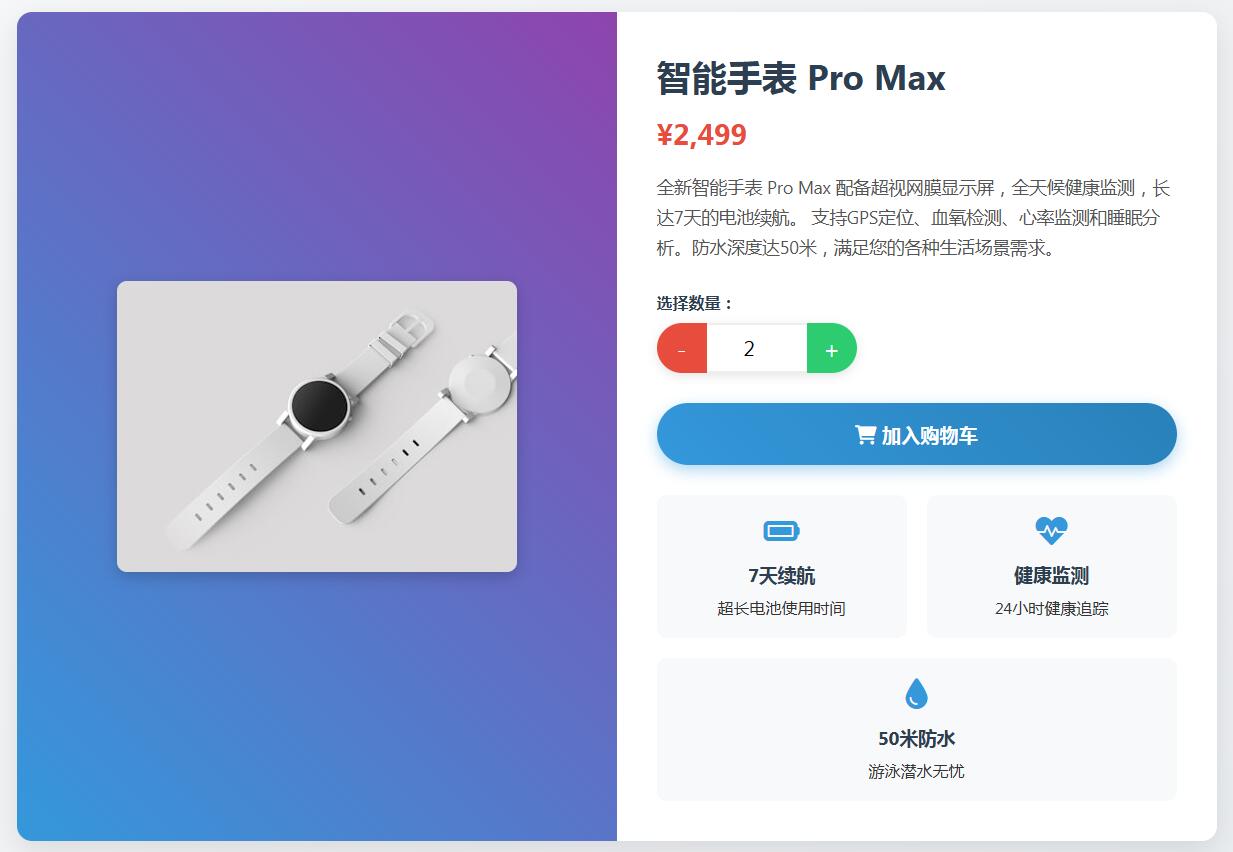
html代码:
<!DOCTYPE html>
<html lang="zh-CN">
<head>
<meta charset="UTF-8">
<meta name="viewport" content="width=device-width, initial-scale=1.0">
<title>产品详情 - 购物车数量选择器</title>
<link rel="stylesheet" href="https://cdnjs.cloudflare.com/ajax/libs/font-awesome/6.0.0/css/all.min.css">
<style>
* {
margin: 0;
padding: 0;
box-sizing: border-box;
font-family: 'Segoe UI', Tahoma, Geneva, Verdana, sans-serif;
}
body {
background: linear-gradient(135deg, #f8f9fa, #e9ecef);
min-height: 100vh;
padding: 20px;
color: #333;
}
.container {
max-width: 1200px;
margin: 0 auto;
}
header {
text-align: center;
margin-bottom: 40px;
padding: 20px;
}
header h1 {
font-size: 2.5rem;
color: #2c3e50;
margin-bottom: 10px;
}
.product-container {
display: flex;
flex-wrap: wrap;
background: white;
border-radius: 15px;
overflow: hidden;
box-shadow: 0 10px 30px rgba(0, 0, 0, 0.1);
}
.product-image {
flex: 1;
min-width: 300px;
background: linear-gradient(45deg, #3498db, #8e44ad);
display: flex;
align-items: center;
justify-content: center;
padding: 40px;
}
.product-image img {
max-width: 100%;
max-height: 400px;
border-radius: 10px;
box-shadow: 0 5px 15px rgba(0, 0, 0, 0.2);
}
.product-details {
flex: 1;
min-width: 300px;
padding: 40px;
}
.product-title {
font-size: 2.2rem;
margin-bottom: 15px;
color: #2c3e50;
}
.product-price {
font-size: 1.8rem;
color: #e74c3c;
font-weight: bold;
margin-bottom: 20px;
}
.product-description {
color: #555;
line-height: 1.7;
margin-bottom: 30px;
font-size: 1.1rem;
}
.quantity-selector {
margin-bottom: 30px;
}
.quantity-selector label {
display: block;
margin-bottom: 10px;
font-weight: 600;
color: #2c3e50;
}
.quantity-control {
display: flex;
width: 200px;
border-radius: 50px;
overflow: hidden;
box-shadow: 0 3px 10px rgba(0, 0, 0, 0.1);
}
.quantity-btn {
width: 50px;
height: 50px;
background: #3498db;
color: white;
border: none;
font-size: 1.5rem;
cursor: pointer;
transition: all 0.3s ease;
}
.quantity-btn.decrement {
background: #e74c3c;
}
.quantity-btn.increment {
background: #2ecc71;
}
.quantity-btn:hover {
opacity: 0.9;
transform: scale(1.05);
}
.quantity-input {
width: 100px;
height: 50px;
text-align: center;
font-size: 1.3rem;
border: none;
border-top: 2px solid #eee;
border-bottom: 2px solid #eee;
outline: none;
}
.add-to-cart-btn {
display: block;
width: 100%;
padding: 18px;
background: linear-gradient(45deg, #3498db, #2980b9);
color: white;
border: none;
border-radius: 50px;
font-size: 1.2rem;
font-weight: 600;
cursor: pointer;
transition: all 0.3s ease;
box-shadow: 0 5px 15px rgba(52, 152, 219, 0.4);
}
.add-to-cart-btn:hover {
transform: translateY(-3px);
box-shadow: 0 8px 20px rgba(52, 152, 219, 0.6);
}
.add-to-cart-btn:active {
transform: translateY(1px);
}
.notification {
position: fixed;
top: 20px;
right: 20px;
background: rgba(46, 204, 113, 0.95);
color: white;
padding: 15px 25px;
border-radius: 10px;
font-weight: 600;
box-shadow: 0 5px 15px rgba(0, 0, 0, 0.2);
transform: translateX(200%);
transition: transform 0.5s ease;
z-index: 1000;
}
.notification.show {
transform: translateX(0);
}
.notification i {
margin-right: 10px;
}
.features {
display: flex;
flex-wrap: wrap;
margin-top: 30px;
gap: 20px;
}
.feature {
flex: 1;
min-width: 200px;
padding: 20px;
background: #f8f9fa;
border-radius: 10px;
text-align: center;
}
.feature i {
font-size: 2rem;
color: #3498db;
margin-bottom: 15px;
}
.feature h3 {
margin-bottom: 10px;
color: #2c3e50;
}
@media (max-width: 768px) {
.product-container {
flex-direction: column;
}
.product-image, .product-details {
width: 100%;
}
.quantity-control {
width: 100%;
}
}
</style>
</head>
<body>
<div class="container">
<header>
<h1>智能手表 Pro Max</h1>
<p>重新定义您的健康与生活方式</p>
</header>
<div class="product-container">
<div class="product-image">
<img src="https://images.unsplash.com/photo-1523275335684-37898b6baf30?q=80&w=400" alt="智能手表 Pro Max">
</div>
<div class="product-details">
<h2 class="product-title">智能手表 Pro Max</h2>
<div class="product-price">¥2,499</div>
<p class="product-description">
全新智能手表 Pro Max 配备超视网膜显示屏,全天候健康监测,长达7天的电池续航。
支持GPS定位、血氧检测、心率监测和睡眠分析。防水深度达50米,满足您的各种生活场景需求。
</p>
<div class="quantity-selector">
<label for="quantity">选择数量:</label>
<div class="quantity-control">
<button class="quantity-btn decrement" id="decrement">-</button>
<input type="number" class="quantity-input" id="quantity" value="1" min="1" max="99">
<button class="quantity-btn increment" id="increment">+</button>
</div>
</div>
<button class="add-to-cart-btn" onclick="addToCart()">
<i class="fas fa-shopping-cart"></i> 加入购物车
</button>
<div class="features">
<div class="feature">
<i class="fas fa-battery-full"></i>
<h3>7天续航</h3>
<p>超长电池使用时间</p>
</div>
<div class="feature">
<i class="fas fa-heartbeat"></i>
<h3>健康监测</h3>
<p>24小时健康追踪</p>
</div>
<div class="feature">
<i class="fas fa-tint"></i>
<h3>50米防水</h3>
<p>游泳潜水无忧</p>
</div>
</div>
</div>
</div>
</div>
<div class="notification" id="notification">
<i class="fas fa-check-circle"></i>
<span id="notification-text">商品已成功加入购物车!</span>
</div>
<script>
// 模拟购物车对象
const Cart = {
add: function(productId, productName, productImage, quantity) {
// 在实际应用中,这里会有购物车逻辑
console.log(`添加到购物车:
ID: ${productId},
名称: ${productName},
图片: ${productImage},
数量: ${quantity}`);
// 显示通知
showNotification(`已添加 ${quantity} 件 ${productName} 到购物车`);
}
};
// 获取DOM元素
const quantityInput = document.getElementById('quantity');
const decrementBtn = document.getElementById('decrement');
const incrementBtn = document.getElementById('increment');
const notification = document.getElementById('notification');
const notificationText = document.getElementById('notification-text');
// 增加数量
incrementBtn.addEventListener('click', () => {
let value = parseInt(quantityInput.value);
if (value < 99) {
quantityInput.value = value + 1;
}
});
// 减少数量
decrementBtn.addEventListener('click', () => {
let value = parseInt(quantityInput.value);
if (value > 1) {
quantityInput.value = value - 1;
}
});
// 输入框验证
quantityInput.addEventListener('input', () => {
let value = parseInt(quantityInput.value);
if (isNaN(value) || value < 1) {
quantityInput.value = 1;
} else if (value > 99) {
quantityInput.value = 99;
}
});
// 加入购物车函数
function addToCart() {
const productId = 'SMW2023PRO'; // 实际应用中应为动态值
const productName = '智能手表 Pro Max';
const productImage = 'watch.jpg';
const quantity = parseInt(quantityInput.value);
// 调用购物车方法
Cart.add(productId, productName, productImage, quantity);
}
// 显示通知
function showNotification(message) {
notificationText.textContent = message;
notification.classList.add('show');
setTimeout(() => {
notification.classList.remove('show');
}, 3000);
}
</script>
</body>
</html>
我是有底线的
扫描二维码手机查看该文章
文章引用:https://www.qinghuahulian.com/news/webzhishi/1519.html
- 上一篇:没有了!
- 下一篇:点击加号控制折叠内容区域展开或关闭代码分享
 在线咨询
在线咨询 电话咨询
电话咨询


