


酒庄参观预约表单系统代码分享,实例截图如下:
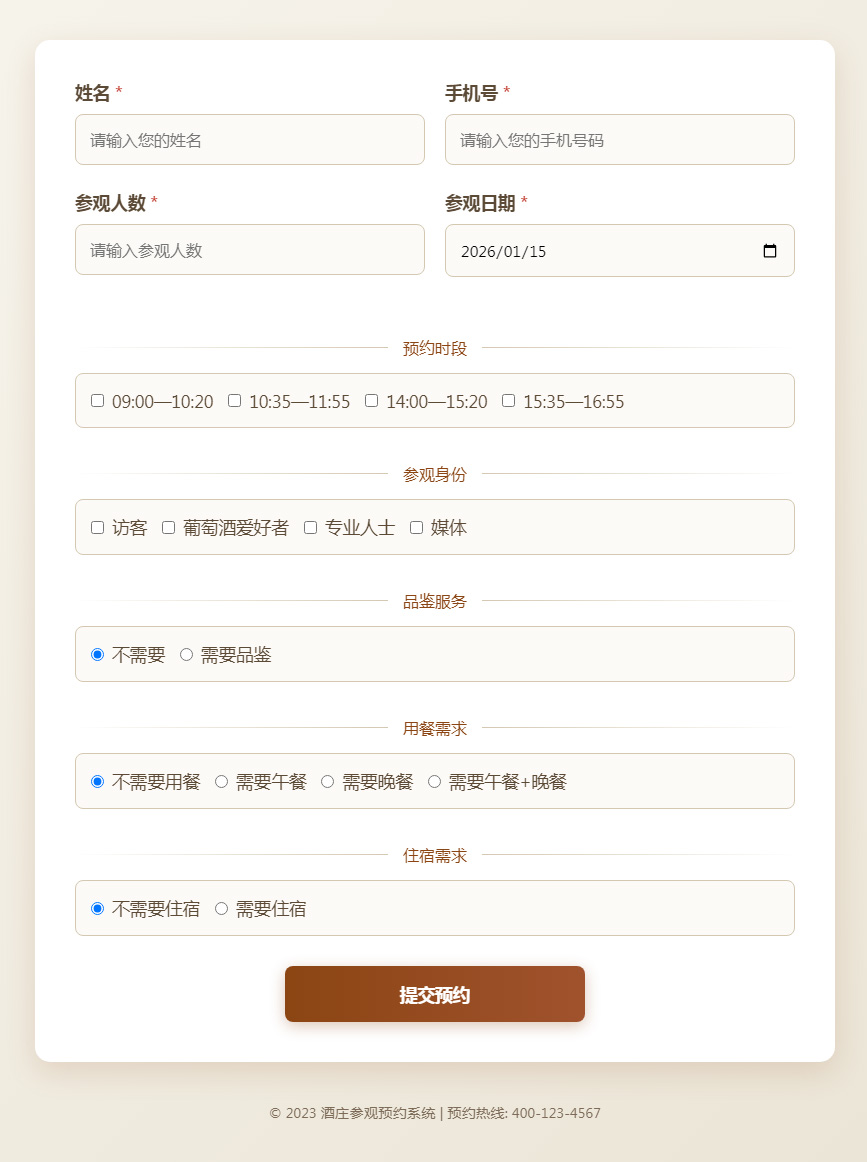
html代码:
<!DOCTYPE html>
<html>
<head>
    <meta charset="UTF-8">
    <meta name="viewport" content="width=device-width, initial-scale=1.0">
    <title>酒庄参观预约</title>
    <link rel="stylesheet" href="https://cdnjs.cloudflare.com/ajax/libs/font-awesome/6.4.0/css/all.min.css">
    <style>
        * {
            margin: 0;
            padding: 0;
            box-sizing: border-box;
            font-family: 'Segoe UI', Tahoma, Geneva, Verdana, sans-serif;
        }

        body {
            background: linear-gradient(135deg, #f9f7f0, #e8e1d1);
            min-height: 100vh;
            display: flex;
            flex-direction: column;
            align-items: center;
            padding: 40px 20px;
            color: #4a3c2a;
        }

        .header {
            text-align: center;
            margin-bottom: 40px;
            width: 100%;
            max-width: 800px;
        }

        .header h1 {
            font-size: 2.8rem;
            margin-bottom: 10px;
            color: #8b4513;
            text-shadow: 1px 1px 2px rgba(0,0,0,0.1);
        }

        .header p {
            font-size: 1.2rem;
            color: #7d6b58;
            max-width: 600px;
            margin: 0 auto;
            line-height: 1.6;
        }

        .wine-icon {
            font-size: 2.5rem;
            color: #8b4513;
            margin-bottom: 20px;
        }

        .form-container {
            background: white;
            border-radius: 15px;
            box-shadow: 0 10px 30px rgba(139, 69, 19, 0.15);
            padding: 40px;
            width: 100%;
            max-width: 800px;
        }

        .form-group {
            margin-bottom: 25px;
        }

        .form-group label {
            display: block;
            margin-bottom: 10px;
            font-weight: 600;
            font-size: 1.1rem;
            color: #5c4a36;
        }

        .form-group .required::after {
            content: " *";
            color: #c0392b;
        }

        input, select {
            width: 100%;
            padding: 14px;
            border: 1px solid #d4c8b1;
            border-radius: 8px;
            font-size: 1rem;
            background-color: #fcfaf7;
            transition: all 0.3s ease;
        }

        input:focus, select:focus {
            outline: none;
            border-color: #b09a7a;
            box-shadow: 0 0 0 3px rgba(176, 154, 122, 0.2);
        }

        .checkbox-group, .radio-group {
            display: flex;
            flex-wrap: wrap;
            gap: 15px;
            padding: 15px;
            border: 1px solid #d4c8b1;
            border-radius: 8px;
            background-color: #fcfaf7;
        }

        .checkbox-item, .radio-item {
            display: flex;
            align-items: center;
        }

        .checkbox-item input, .radio-item input {
            width: auto;
            margin-right: 8px;
        }

        .checkbox-item label, .radio-item label {
            margin: 0;
            font-weight: normal;
            cursor: pointer;
        }

        .form-row {
            display: flex;
            gap: 20px;
        }

        .form-row .form-group {
            flex: 1;
        }

        .submit-btn {
            background: linear-gradient(to right, #8b4513, #a0522d);
            color: white;
            border: none;
            padding: 16px 40px;
            font-size: 1.1rem;
            font-weight: 600;
            border-radius: 8px;
            cursor: pointer;
            transition: all 0.3s ease;
            display: block;
            margin: 30px auto 0;
            width: 60%;
            max-width: 300px;
            box-shadow: 0 4px 15px rgba(139, 69, 19, 0.3);
        }

        .submit-btn:hover {
            background: linear-gradient(to right, #a0522d, #8b4513);
            transform: translateY(-2px);
            box-shadow: 0 6px 20px rgba(139, 69, 19, 0.4);
        }

        .section-title {
            display: flex;
            align-items: center;
            margin: 35px 0 15px;
            color: #8b4513;
        }

        .section-title::before {
            content: "";
            flex: 1;
            height: 1px;
            background: linear-gradient(to right, transparent, #d4c8b1);
            margin-right: 15px;
        }

        .section-title::after {
            content: "";
            flex: 1;
            height: 1px;
            background: linear-gradient(to left, transparent, #d4c8b1);
            margin-left: 15px;
        }

        .footer {
            margin-top: 40px;
            text-align: center;
            color: #7d6b58;
            font-size: 0.9rem;
            width: 100%;
            max-width: 800px;
        }

        @media (max-width: 768px) {
            .form-row {
                flex-direction: column;
                gap: 15px;
            }

            .form-container {
                padding: 25px;
            }

            .header h1 {
                font-size: 2.2rem;
            }
        }
    </style>
</head>
<body>

    <div>
        <form id="reservationForm">
            <div>
                <div>
                    <label for="name">姓名</label>
                    <input type="text" id="name" name="name" required placeholder="请输入您的姓名">
                </div>

                <div>
                    <label for="phone">手机号</label>
                    <input type="tel" id="phone" name="phone" required placeholder="请输入您的手机号码">
                </div>
            </div>

            <div>
                <div>
                    <label for="visitors">参观人数</label>
                    <input type="number" id="visitors" name="visitors" min="1" max="20" required placeholder="请输入参观人数">
                </div>

                <div>
                    <label for="date">参观日期</label>
                    <input type="date" id="date" name="date" required>
                </div>
            </div>

            <div>预约时段</div>
            <div>
                <div>
                    <div>
                        <input type="checkbox" id="time1" name="time" value="09:00—10:20">
                        <label for="time1">09:00—10:20</label>
                    </div>
                    <div>
                        <input type="checkbox" id="time2" name="time" value="10:35—11:55">
                        <label for="time2">10:35—11:55</label>
                    </div>
                    <div>
                        <input type="checkbox" id="time3" name="time" value="14:00—15:20">
                        <label for="time3">14:00—15:20</label>
                    </div>
                    <div>
                        <input type="checkbox" id="time4" name="time" value="15:35—16:55">
                        <label for="time4">15:35—16:55</label>
                    </div>
                </div>
            </div>

            <div>参观身份</div>
            <div>
                <div>
                    <div>
                        <input type="checkbox" id="identity1" name="identity" value="访客">
                        <label for="identity1">访客</label>
                    </div>
                    <div>
                        <input type="checkbox" id="identity2" name="identity" value="葡萄酒爱好者">
                        <label for="identity2">葡萄酒爱好者</label>
                    </div>
                    <div>
                        <input type="checkbox" id="identity3" name="identity" value="专业人士">
                        <label for="identity3">专业人士</label>
                    </div>
                    <div>
                        <input type="checkbox" id="identity4" name="identity" value="媒体">
                        <label for="identity4">媒体</label>
                    </div>
                </div>
            </div>

            <div>品鉴服务</div>
            <div>
                <div>
                    <div>
                        <input type="radio" id="tasting1" name="tasting" value="不需要" checked>
                        <label for="tasting1">不需要</label>
                    </div>
                    <div>
                        <input type="radio" id="tasting2" name="tasting" value="需要品鉴">
                        <label for="tasting2">需要品鉴</label>
                    </div>
                </div>
            </div>

            <div>用餐需求</div>
            <div>
                <div>
                    <div>
                        <input type="radio" id="dining1" name="dining" value="不需要用餐" checked>
                        <label for="dining1">不需要用餐</label>
                    </div>
                    <div>
                        <input type="radio" id="dining2" name="dining" value="需要午餐">
                        <label for="dining2">需要午餐</label>
                    </div>
                    <div>
                        <input type="radio" id="dining3" name="dining" value="需要晚餐">
                        <label for="dining3">需要晚餐</label>
                    </div>
                    <div>
                        <input type="radio" id="dining4" name="dining" value="需要午餐+晚餐">
                        <label for="dining4">需要午餐+晚餐</label>
                    </div>
                </div>
            </div>

            <div>住宿需求</div>
            <div>
                <div>
                    <div>
                        <input type="radio" id="accommodation1" name="accommodation" value="不需要住宿" checked>
                        <label for="accommodation1">不需要住宿</label>
                    </div>
                    <div>
                        <input type="radio" id="accommodation2" name="accommodation" value="需要住宿">
                        <label for="accommodation2">需要住宿</label>
                    </div>
                </div>
            </div>

            <button type="submit">提交预约</button>
        </form>
    </div>

    <div>
        <p>© 2026 酒庄参观预约系统 | 预约热线: 400-123-4567</p>
    </div>

    <script>
        // 设置日期选择器的最小值为今天
        document.addEventListener('DOMContentLoaded', function() {
            const today = new Date();
            const dd = String(today.getDate()).padStart(2, '0');
            const mm = String(today.getMonth() + 1).padStart(2, '0'); // 月份从0开始
            const yyyy = today.getFullYear();

            const minDate = yyyy + '-' + mm + '-' + dd;
            document.getElementById('date').min = minDate;
            document.getElementById('date').value = minDate;

            // 表单提交处理
            document.getElementById('reservationForm').addEventListener('submit', function(e) {
                e.preventDefault();

                // 在实际应用中,这里会有表单验证和提交逻辑
                alert('预约信息已提交!我们将尽快与您联系确认。');
            });
        });
    </script>
</body>
</html>
我是有底线的
扫描二维码手机查看该文章
文章引用:https://www.qinghuahulian.com/news/webzhishi/1516.html
- 上一篇:点击加号控制折叠内容区域展开或关闭代码分享
- 下一篇:车牌号点击选择输入表单代码分享
 在线咨询
在线咨询 电话咨询
电话咨询


