


车牌号点击选择输入表单代码分享,实例截图如下:
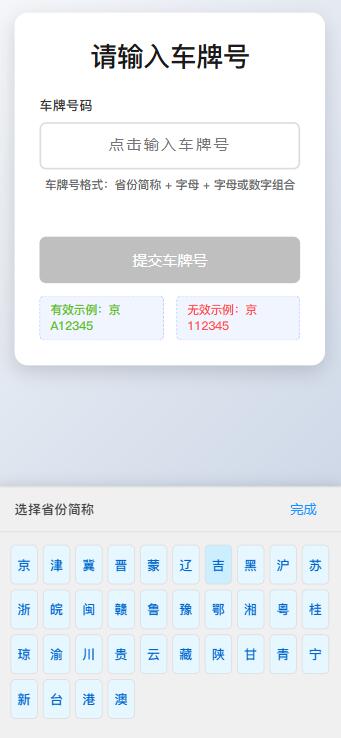
html代码:
<!DOCTYPE html>
<html>
<head>
<meta charset="UTF-8">
<meta name="viewport" content="width=device-width, initial-scale=1.0">
<title>车牌号输入表单</title>
<style>
* {
box-sizing: border-box;
margin: 0;
padding: 0;
}
body {
font-family: 'PingFang SC', 'Microsoft YaHei', sans-serif;
display: flex;
flex-direction: column;
align-items: center;
min-height: 100vh;
background: linear-gradient(135deg, #f5f7fa 0%, #c3cfe2 100%);
padding: 20px;
color: #333;
}
.container {
width: 100%;
max-width: 500px;
background: white;
border-radius: 16px;
box-shadow: 0 8px 24px rgba(0, 0, 0, 0.15);
padding: 30px;
margin-bottom: 30px;
}
h1 {
text-align: center;
margin-bottom: 25px;
color: #1a1a1a;
font-weight: 600;
}
.form-group {
margin-bottom: 25px;
position: relative;
}
label {
display: block;
margin-bottom: 10px;
font-weight: 500;
color: #333;
font-size: 16px;
}
#licenseInput {
width: 100%;
padding: 16px;
border: 2px solid #ddd;
border-radius: 8px;
font-size: 18px;
text-align: center;
letter-spacing: 3px;
caret-color: #1890ff;
font-weight: 500;
transition: all 0.3s ease;
}
#licenseInput:focus {
outline: none;
border-color: #1890ff;
box-shadow: 0 0 0 3px rgba(24, 144, 255, 0.2);
}
.input-hint {
text-align: center;
color: #666;
font-size: 14px;
margin-top: 8px;
}
.validation-message {
text-align: center;
color: #ff4d4f;
font-size: 14px;
margin-top: 8px;
min-height: 20px;
}
.keyboard-container {
display: none;
position: fixed;
bottom: 0;
left: 0;
width: 100%;
background: #f0f0f0;
border-top: 1px solid #ddd;
padding: 10px 0;
box-shadow: 0 -4px 15px rgba(0, 0, 0, 0.1);
z-index: 1000;
animation: slideUp 0.3s ease;
}
@keyframes slideUp {
from {
transform: translateY(100%);
}
to {
transform: translateY(0);
}
}
.keyboard-header {
display: flex;
justify-content: space-between;
align-items: center;
padding: 0 20px 12px;
border-bottom: 1px solid #ddd;
}
.keyboard-title {
font-weight: 500;
color: #444;
font-size: 16px;
}
#closeKeyboard {
background: none;
border: none;
color: #1890ff;
font-size: 16px;
font-weight: 500;
cursor: pointer;
padding: 5px 10px;
border-radius: 4px;
}
.keyboard {
display: grid;
grid-template-columns: repeat(10, 1fr);
gap: 6px;
padding: 15px;
}
.keyboard-key {
padding: 12px 0;
background: white;
border: 1px solid #ddd;
border-radius: 6px;
text-align: center;
font-size: 16px;
cursor: pointer;
user-select: none;
transition: all 0.1s ease;
}
.keyboard-key:hover {
background: #f7f7f7;
}
.keyboard-key:active {
background: #e8e8e8;
transform: scale(0.97);
}
.keyboard-key.province {
background: #e6f7ff;
font-weight: 500;
color: #0066cc;
}
.keyboard-key.province:hover {
background: #ccefff;
}
.keyboard-key.action {
background: #f0f0f0;
grid-column: span 2;
font-weight: 500;
}
.keyboard-key.delete {
background: #fff2e8;
color: #ff6600;
}
.keyboard-key.delete:hover {
background: #ffe6d5;
}
.keyboard-key.done {
background: #1890ff;
color: white;
font-weight: 500;
}
.keyboard-key.done:hover {
background: #40a9ff;
}
.keyboard-key.disabled {
opacity: 0.5;
cursor: not-allowed;
}
#submitBtn {
width: 100%;
padding: 16px;
background: #1890ff;
color: white;
border: none;
border-radius: 8px;
font-size: 18px;
font-weight: 500;
cursor: pointer;
transition: background 0.2s;
box-shadow: 0 4px 8px rgba(24, 144, 255, 0.3);
}
#submitBtn:hover {
background: #40a9ff;
box-shadow: 0 5px 12px rgba(24, 144, 255, 0.4);
}
#submitBtn:disabled {
background: #bfbfbf;
cursor: not-allowed;
box-shadow: none;
}
.example-plate {
display: flex;
justify-content: center;
margin-top: 15px;
gap: 15px;
}
.example {
padding: 6px 12px;
background: #f0f5ff;
border-radius: 6px;
font-size: 14px;
color: #1a3c6e;
border: 1px dashed #adc6ff;
}
.valid-example {
color: #52c41a;
}
.invalid-example {
color: #ff4d4f;
}
</style>
</head>
<body>
<div>
<h1>请输入车牌号</h1>
<form id="licenseForm">
<div>
<label for="licenseInput">车牌号码</label>
<input type="text" id="licenseInput" placeholder="点击输入车牌号" readonly>
<div>车牌号格式:省份简称 + 字母 + 字母或数字组合</div>
<div id="validationMessage"></div>
</div>
<button type="button" id="submitBtn" disabled>提交车牌号</button>
</form>
<div>
<div class="example valid-example">有效示例:京A12345</div>
<div class="example invalid-example">无效示例:京112345</div>
</div>
</div>
<div id="keyboardContainer">
<div>
<span id="keyboardTitle">选择省份简称</span>
<button id="closeKeyboard">完成</button>
</div>
<div id="keyboard"></div>
</div>
<script>
document.addEventListener('DOMContentLoaded', function() {
const licenseInput = document.getElementById('licenseInput');
const keyboardContainer = document.getElementById('keyboardContainer');
const keyboard = document.getElementById('keyboard');
const closeKeyboard = document.getElementById('closeKeyboard');
const keyboardTitle = document.getElementById('keyboardTitle');
const submitBtn = document.getElementById('submitBtn');
const validationMessage = document.getElementById('validationMessage');
// 省份简称列表
const provinces = [
'京', '津', '冀', '晋', '蒙', '辽', '吉', '黑',
'沪', '苏', '浙', '皖', '闽', '赣', '鲁', '豫',
'鄂', '湘', '粤', '桂', '琼', '渝', '川', '贵',
'云', '藏', '陕', '甘', '青', '宁', '新', '台',
'港', '澳'
];
// 字母数字键盘布局
const alphanumericKeys = [
'1', '2', '3', '4', '5', '6', '7', '8', '9', '0',
'Q', 'W', 'E', 'R', 'T', 'Y', 'U', 'I', 'O', 'P',
'A', 'S', 'D', 'F', 'G', 'H', 'J', 'K', 'L',
'Z', 'X', 'C', 'V', 'B', 'N', 'M',
'完成', '删除'
];
// 点击输入框显示键盘
licenseInput.addEventListener('click', function() {
keyboardContainer.style.display = 'block';
// 如果输入框为空,显示省份键盘
if (!licenseInput.value) {
showProvinceKeyboard();
} else {
showAlphanumericKeyboard();
}
});
// 关闭键盘
closeKeyboard.addEventListener('click', function() {
keyboardContainer.style.display = 'none';
validateLicensePlate();
});
// 显示省份简称键盘
function showProvinceKeyboard() {
keyboardTitle.textContent = '选择省份简称';
keyboard.innerHTML = '';
provinces.forEach(province => {
const key = document.createElement('div');
key.className = 'keyboard-key province';
key.textContent = province;
key.addEventListener('click', function() {
licenseInput.value = province;
// 选择省份后自动显示字母数字键盘
showAlphanumericKeyboard();
});
keyboard.appendChild(key);
});
}
// 显示字母数字键盘
function showAlphanumericKeyboard() {
keyboardTitle.textContent = '输入车牌号';
keyboard.innerHTML = '';
alphanumericKeys.forEach(keyChar => {
const key = document.createElement('div');
if (keyChar === '完成') {
key.className = 'keyboard-key action done';
key.textContent = keyChar;
key.addEventListener('click', function() {
keyboardContainer.style.display = 'none';
validateLicensePlate();
});
} else if (keyChar === '删除') {
key.className = 'keyboard-key action delete';
key.textContent = '⌫';
key.addEventListener('click', function() {
licenseInput.value = licenseInput.value.slice(0, -1);
// 如果删除后内容为空,切换回省份键盘
if (!licenseInput.value) {
showProvinceKeyboard();
} else {
// 重新生成键盘以更新键的状态
showAlphanumericKeyboard();
validateLicensePlate();
}
});
} else {
key.className = 'keyboard-key';
key.textContent = keyChar;
// 检查是否需要禁用此键
let shouldDisable = false;
// 如果是第二个字符,必须是字母
if (licenseInput.value.length === 1 && !isLetter(keyChar)) {
shouldDisable = true;
}
// 如果已达到最大长度,禁用所有输入键
if (licenseInput.value.length >= 8) {
shouldDisable = true;
}
if (shouldDisable) {
key.classList.add('disabled');
} else {
key.addEventListener('click', function() {
// 限制车牌号长度(最多8个字符)
if (licenseInput.value.length < 8) {
licenseInput.value += keyChar;
validateLicensePlate();
// 重新生成键盘以更新键的状态
showAlphanumericKeyboard();
}
});
}
}
keyboard.appendChild(key);
});
}
// 验证车牌号格式
function validateLicensePlate() {
const licenseNumber = licenseInput.value.trim();
// 清空之前的验证消息
validationMessage.textContent = '';
validationMessage.style.color = '#ff4d4f';
// 如果为空,禁用提交按钮
if (!licenseNumber) {
submitBtn.disabled = true;
return;
}
// 验证第二个字符必须是字母
if (licenseNumber.length >= 2) {
const secondChar = licenseNumber.charAt(1);
if (!isLetter(secondChar)) {
validationMessage.textContent = '第二个字符必须是字母';
submitBtn.disabled = true;
return;
}
}
// 验证车牌号长度
if (licenseNumber.length < 2 || licenseNumber.length > 8) {
validationMessage.textContent = '车牌号长度应在2-8个字符之间';
submitBtn.disabled = true;
return;
}
// 验证通过
validationMessage.textContent = '车牌号格式正确';
validationMessage.style.color = '#52c41a';
submitBtn.disabled = false;
}
// 检查字符是否为字母
function isLetter(char) {
return /^[A-Za-z]$/.test(char);
}
// 提交表单
submitBtn.addEventListener('click', function() {
const licenseNumber = licenseInput.value.trim();
if (!licenseNumber) {
validationMessage.textContent = '请输入车牌号码';
validationMessage.style.color = '#ff4d4f';
licenseInput.focus();
return;
}
// 验证车牌号格式
validateLicensePlate();
if (submitBtn.disabled) {
return;
}
// 显示提交结果
alert(`提交成功!车牌号:${licenseNumber}`);
});
});
</script>
</body>
</html>
我是有底线的
扫描二维码手机查看该文章
文章引用:https://www.qinghuahulian.com/news/webzhishi/1515.html
- 上一篇:酒庄参观预约表单系统代码分享
- 下一篇:建设一个响应式外贸网站的优势有哪些?
 在线咨询
在线咨询 电话咨询
电话咨询


